Sadly, it was our last Professional Experience 3 tutorial last Monday. One of the first things our lecturer gave us to do, was to fill in a 'TPACK' survey. Now, what exactly is TPACK?
TPACK is: 'Technological Pedagogical Content Knowledge'. It attempts to capture some of the essential qualities of knowledge required by teachers for technology integration in their teaching, while addressing the complex, multifaceted and situated nature of teacher knowledge.
Although I believe I respond well to visual imagery, and consider myself a visual learner, I absolutely can't stand diagrams like the one above! Especially with all that jargon! Anyway, I do get the point, and agree that is important for teachers to combine their knowledge about children, their knowledge about the content of work and their knowledge about technology. This brings about well rounded learning, and so all teachers and pre-service teachers should consider this diagram when planning to teach with technology.
UPDATE: take a look at my lovely friend Vanessa's vodcast about Tpack!
Showing posts with label technology. Show all posts
Showing posts with label technology. Show all posts
Thursday, June 10, 2010


Friday, June 4, 2010
catching up on some blogs.

 images by morgan
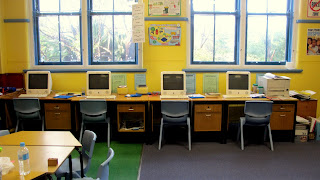
(my prac classroom)
The issue of advancing technology and the question of whether to include it all in the classroom, is difficult for me to respond to. Like alot of other people, I was fortunate enough to have a smartboard in my prac classroom. But did it add to learning? I am not quite sure. Of course, it was great fun to use, but was it purely novelty? I have been reading Liam's blog, and he asks:
"...are smart boards enhancing learning or detracting from? Are they drawing the classes’ attention away from the lesson at hand with loud noises, distracting behaviours and an incessant need to break the ‘keep your hands to yourself’ rule. Are smart boards the new class clown?"
These questions NEED to be asked. In my class, smartboards were definately distracting. I constantly needed to reinforce 'no hands on the smartboard screen or touching the smartboard pen" etc. It became frustrating. But then again, there were times where it was just so much fun, the kids loved it, and wanted to be involved. Do you think though, that in a few years, this novelty will wear out?
I'm not sure about bringing EVERY little bit of technology into our schools. I really don't think it is necessary to have Ipods, Ipads, and Iphones in the classroom! Seriously, there needs to be a balance. Maybe I'm just getting a little sick of all this technology!
Saturday, May 15, 2010
Second Week at Botany Public.
 our collaborative class portrait!
It was extremely busy, due to the controversial NAPLAN tests, but very fun as well!
Tuesday: PDHPE lesson focusing on the heart/pulse, with skipping in the afternoon.
(This lesson was CRAZY, due to being held straight after NAPLAN tests, but essentially it worked out okay.)
Wednesday: Read 'The Magic School Bus - Inside the Human Body', Drama games, and introduction lesson for 'Picasso Portraits'.
(Again, being held after NAPLAN triggers problems such as restlesness. Kids loved the drama games such as 'working machine' and 'hula-hoop circle'. They also loved the Magic School Bus book, and they actually learnt quite alot from it! The introductory lesson for the 'Picasso Portraits' was half failure, half success - if that makes sense! We only had 30 minutes, and the slideshow I prepared for the smartboard proved too exciting for them, sending them into a talking frenzy.)
Thursday: 'The Singing Hat' book review, and 'Mr Picasso Head' collaborative class portrait and planning individual portraits.
(The students liked the book, and payed attention throughout. The concept of a book review as a structured text was maybe out of their reach for that afternoon though! I uploaded the book review proforma sheet onto the smartboard and wrote ideas directly on it, which was awesome! But even though I said for students NOT to copy what was on the board but to use it to jog their memory (as I had written in bullet points) they still did copy. SO ANNOYING! I wish they had the initiative to think for themselves! haha, maybe I need to teach them that first! But, the 'Mr Picasso Head' collaborative portraits lesson went so well! Maybe my best lesson to date! I had the site opened on the smartboard, and used it as an aide to further reflect and explain abstract art. I chose well behaved students to 'add' to our group portrait, and they LOVED it! Then, as we had time, we 'planned' our own portraits, using abstract elements. What was annoying however, was that my co-operating teacher decided to leave the room during the lesson for some reason, and she didn't get to see what the children did.)
Friday: Social maths games (3D objects, Chance/Data, Addition/Subtraction), and 'Cup Rocket' science lesson.
(Social maths games were fun. First was a game of 'BUZZ OFF'. I love tricking the children, they think they are playing but they are actually learning! We had different stations, focusing on what they had learnt throughout last week, in order to revise and remember, and apply. They worked individually, or in pairs/threes, and I gave them different 'challenges'. The science lesson went REALLY well! I was so surprised! We looked at 'force' and 'energy transference' through the experiment of a paper cup rocket. I got the experiment from a book titled 'Science toys and crafts - Years 3-6' by Barbara J. Fagenbaum. It is an excellent source of fun and interactive experiments.)
The week was stressful and busy, yet exciting and rewarding. I am really happy I was able to witness the structure of the NAPLAN tests aswell. Overall, I think it was a successful week.
Just two more prac days to go!
Saturday, May 8, 2010
Time to Teach.
 (scanned image)
Pheewww!
What a week! I have just finished my first week of Prac at Botany Public School on a darling little year 3 class. I had so much fun, but boy, it was hard work!
My co-operating teacher, Kim Briggs, is fantastic. So helpful and encouraging, she has let me find my feet in her classroom.
Wednesday was my first real teaching day, and since they are doing the COGS unit of 'Growth and Change', I decided to present a lesson on the skeletal system. It went really well, the children were engaged and enthusiastic about the activity (naming bones, pretending we have no bones, making their own skeleton poster).
Thursday, I presented an 'interactive tangram lesson' on their newly installed Smartboard. I first read a story (Grandfather Tang's Story) which focused on Tangrams - which they loved! Then I explained what Tangrams were, their history and had this site up on the smartboard behind me: http://pbskids.org/cyberchase/games/area/tangram.html
They loved getting up and having a go at 'rotating' and 'flipping' the shapes to make the different animals and objects.
On Friday I presented a 'social maths' lesson, which basically allows the children to have 'free play' but with mathematic activities. I didn't explain things well in this lesson, so everyone was a bit confused. But I brought everyone back on the floor and re-explained everything, so everyone understood at the end. There were 4 'stations' of activities:
1) Interactive Tangrams
2) Ruler/Cube game
3) Geometric shape building
4) 3D Shape building
The essence of 'social maths' is for the teacher to allow children to discover mathematical concepts for themselves. I just walked around while they were playing and asked them open-ended questions about the games they were playing.
Overall, it was a great week. The school is so supportive of young teachers and prac students, so we are all made to feel welcome. Also, the school places emphasis on implementing technology, and I was so impressed to see that all teachers had MacBooks in their rooms, along with their own smartboards, and the library had about 30 large MacBooks. Really great resources!
Next week I plan to do lessons on:
- the circulatory system
- portraits in cubist style (using Mr Picasso Head)
- book review on Tohby Riddle's 'The Singing Hat' to encourage a more defined vocab
- more maths games
- a interactive science experiment (any ideas anyone! I have NO idea about science!)
What a week! I have just finished my first week of Prac at Botany Public School on a darling little year 3 class. I had so much fun, but boy, it was hard work!
My co-operating teacher, Kim Briggs, is fantastic. So helpful and encouraging, she has let me find my feet in her classroom.
Wednesday was my first real teaching day, and since they are doing the COGS unit of 'Growth and Change', I decided to present a lesson on the skeletal system. It went really well, the children were engaged and enthusiastic about the activity (naming bones, pretending we have no bones, making their own skeleton poster).
Thursday, I presented an 'interactive tangram lesson' on their newly installed Smartboard. I first read a story (Grandfather Tang's Story) which focused on Tangrams - which they loved! Then I explained what Tangrams were, their history and had this site up on the smartboard behind me: http://pbskids.org/cyberchase/games/area/tangram.html
They loved getting up and having a go at 'rotating' and 'flipping' the shapes to make the different animals and objects.
On Friday I presented a 'social maths' lesson, which basically allows the children to have 'free play' but with mathematic activities. I didn't explain things well in this lesson, so everyone was a bit confused. But I brought everyone back on the floor and re-explained everything, so everyone understood at the end. There were 4 'stations' of activities:
1) Interactive Tangrams
2) Ruler/Cube game
3) Geometric shape building
4) 3D Shape building
The essence of 'social maths' is for the teacher to allow children to discover mathematical concepts for themselves. I just walked around while they were playing and asked them open-ended questions about the games they were playing.
Overall, it was a great week. The school is so supportive of young teachers and prac students, so we are all made to feel welcome. Also, the school places emphasis on implementing technology, and I was so impressed to see that all teachers had MacBooks in their rooms, along with their own smartboards, and the library had about 30 large MacBooks. Really great resources!
Next week I plan to do lessons on:
- the circulatory system
- portraits in cubist style (using Mr Picasso Head)
- book review on Tohby Riddle's 'The Singing Hat' to encourage a more defined vocab
- more maths games
- a interactive science experiment (any ideas anyone! I have NO idea about science!)
Saturday, April 17, 2010
Building Sandcastles
 Thanks to this flickrer!
Who knew that when you were a child, playing by the seashore and hoping to dig to China, that you were infact LEARNING. But now, reading this article, it all makes sense.
Idit Harel claims that "children learn best when they are in the active roles of designer and constructor, like the kids building the sand castle on the beach". I personally agree and support this notion. I remember back to the 'simple and innocent' times where I played aimlessly with my brother on the white Bondi Beach sands, creating masterpieces like the image above. (Ok, well maybe not as good!). But I remember trying to make tunnels and bridges through the sand, and becoming frustrated when the sand would collapse around me. I soon realised that I needed to have a strong support or foundation for the bridge to actually hold up. When I realised this, after many trials and errors - I perfected the art of sand bridge making! And I guess to this day, I still can make a pretty good sand bridge!
But back to the point - this 'constructionist' approach to learning is pretty accurate. I really believe learning becomes more personal/emotional/and meaningful when the child discovers something on their own, through their own 'construction', or perhaps even 'deconstruction'.
The article futher reflects on how we as educators can use technology to support this kind of 'sandcastle learning'. Harel states that "the Net...offers a wide-open learning environment in which children can explore the world, express themselves, save their creations, revise and refine them over time and exchange ideas in ways that were simply not possible in the past. But it is not the technologies themselves that are so important; rather, what is important are the ways that we use the technologies and think about them."
YES! This is the point of it all! We shouldn't introduce children to technology just for the sake of it, we should present technologies that sustain and encourage constructionist or 'sandcastle' learning!
Wednesday, April 14, 2010
'The Lace of Life'
One of the guys, Liam, in our class made this awesome digital story. One day, I'm telling myself, I will be able to make something this good! (Hopefully soon, before the due date!)
Monday, April 12, 2010
Finally!
Finally this uploaded! Wow, that took forever!
Today in our tutorial, we focused again on creating our own digital stories. Although my one is slightly dodgy, with all the effects (or lack of them), its still an effort! I created it on iMovie, a program that I first used today, so I'm a bit proud of myself! I don't have a Mac at home, so I will have to use Windows Movie Maker (which, by the way, I downloaded!), which I find actually a lot easier to use than iMovie. All in all, its just a practice run until I create my actual digital learning story.
Thursday, April 8, 2010
Digital Storytelling.
In our tutorials, our class has been studying the benefits of Digital Storytelling. I have been so inspired by this medium, and cannot wait to discover more about it, so that hopefully one day I will be confident enough to use this in my own classroom! Basically, digital storytelling is the practice of using computer based tools (a combination of video/sound/images) to tell a story.
Over the long Easter weekend, I went to my church's Art Exchange festival, where they showcased people's artworks based on the concepts of resurrection, life, love, peace, salvation etc. During the church service, they played one man's video (or digital story) that was amazingly creative. It has further inspired me to not only use this medium, but to use it well.
by Tom Banaszewski
- this online article is great for a simple yet thorough explaination of what digital stories are and how to effectively implement them into the classroom. The article includes step by step procedures on how to use iMovie, and how to incorporate voice, sounds, images and short video clips. The author concludes by stating:
"It's vital to note, of course, that the technology was always secondary to the storytelling. Scanning photographsand hand-drawn images into the computer, using a digital camcorder, importing music, recording voices, and composing and editing their stories using Apple's iMovie program comprised a technological process that enabled students to develop and share a clear, structured, effective story. Technology's place in the classroom has always challenged teachers to maximize their time and resources while proving its worth. The Place Project demonstrated how technology can be instrumental in the perennial student struggle to find voice, confidence, and structure in their writing."
Over the long Easter weekend, I went to my church's Art Exchange festival, where they showcased people's artworks based on the concepts of resurrection, life, love, peace, salvation etc. During the church service, they played one man's video (or digital story) that was amazingly creative. It has further inspired me to not only use this medium, but to use it well.
SOMETIMES - Tim Nagle from Tim Nagle on Vimeo.
Digital Storytelling Finds Its Place in the Classroomby Tom Banaszewski
- this online article is great for a simple yet thorough explaination of what digital stories are and how to effectively implement them into the classroom. The article includes step by step procedures on how to use iMovie, and how to incorporate voice, sounds, images and short video clips. The author concludes by stating:
"It's vital to note, of course, that the technology was always secondary to the storytelling. Scanning photographsand hand-drawn images into the computer, using a digital camcorder, importing music, recording voices, and composing and editing their stories using Apple's iMovie program comprised a technological process that enabled students to develop and share a clear, structured, effective story. Technology's place in the classroom has always challenged teachers to maximize their time and resources while proving its worth. The Place Project demonstrated how technology can be instrumental in the perennial student struggle to find voice, confidence, and structure in their writing."
Discovering New Technologies in the Classroom

Hello! My name is Morgan, and I am currently learning about new technologies in my Professional Experience 3 tutorial. My experience with technology, computer-based, is of a medium level, in that I feel competent using basic programs such as Word/PowerPoint/Publisher and web-based software. I am experimenting with Photoshop at home, however it is hard not knowing what is actually available and how to implement it without instruction from someone who knows exactly how to use it. I am not terrified of technology, but it is slightly intimidating trying a program you haven't used before. Overall, I am more excited rather than nervous to learn more about Information Technologies this year, as I plan to implement this knowledge in the classroom and make my lessons extra fun!
Subscribe to:
Posts (Atom)